Week 10.1 – 30th July. 2021
Experience of Freelancing
Well, where shall I start…This is a major topic for me to talk about, as I have always wanted to give this a try. Ever since I wrote and illustrated my Children’s Books, I had organised what art/ illustration I had to finally show for a portfolio, I thought I was ready to join an agency, and start freelancing..?
However this never happened…
I was determined to give it a go, and I joined an agency called ‘People Per Hour.‘ My experience with this agency was completely different then expected.
They were kind and very helpful, and gave me more details about the freelancing agency, and the process involved. But in-keeping with Phoebe Herring’s Industry experience, I can relate to the part where she mentions;
- Sending her Artwork, then never hearing back from anyone.
- Bidding for new opportunities, small jobs to complete, but the rate you are being charged is not worth your time, or patience.
- Holding back applying for more jobs, just incase the other ones you have bidded for, do come back.
We are asked to consider these questions…
- Could your team benefit from employing a freelancer?
- What skills and competencies are missing from the team composition?
- Do you foresee any issues with employing freelancers so late into the project?
Below are my responses to the above questions.
- The way our team has been working together so far, to bring a new person in, even if he/ she had skills that we didn’t, I think would only hinder the teams progress.
- The only skills that are missing is a UX designer, however the team has worked it out that as we were not creating an app design, and a game to run on PC and Mac instead, we all checked before hand, what we could or couldn’t do as you can see from (week 2’s composition chart). We were all prepared and knew what needed to be worked on.
- Yes for sure, I would never want to employ a freelancer to a project, when you are nearly finished. I don’t see any point, ideally if you needed a certain skill from the beginning, which neither of the team members had, would have been the best time to get someone else on board, as they would need to bond too.
Launchpad Scheme
We are introduced to Warwick New, who had the opportunity to create a startup venture with Falmouth University’s Launchpad Scheme. After watching his video, listed are the key points for; what it offers you, what you can get from creating a startup venture, even if the company fails.??
- Entrepreneurial Skills – What you need to set up your own tech /startup company.
- Practise how to sell and market your product – What makes your artefact/prototypes stand out from the rest.
Warwick highlights a few things, which I think we have already got within our current team, 1) believing in your prototype, knowing there is a gap in the market for it. We have believed in our product since we started, but not quite each other.
Warwick clarify’s how important it is to feel motivated about your product, because as soon as you don’t have faith in your product or your team, you are likely to spiral downwards, as then the motivation/ reason of why you were working on this prototype, seems to disintegrate.
Key lessons we have learned.. .so far..?
- Be open and honest from the start to improve, learn, test, re-make. (move forward for the better).
- Don’t avoid problems, handle them straight away. (don’t let it fester).
- Be sure to compliment each others work from time to time. (show you care).
Week 10.2 – 3rd August. 2021
Final piece of art to work on…
Here is a preview of our Trello board which shows the progress we have made so far with our prototype for our game Keep it Burning.
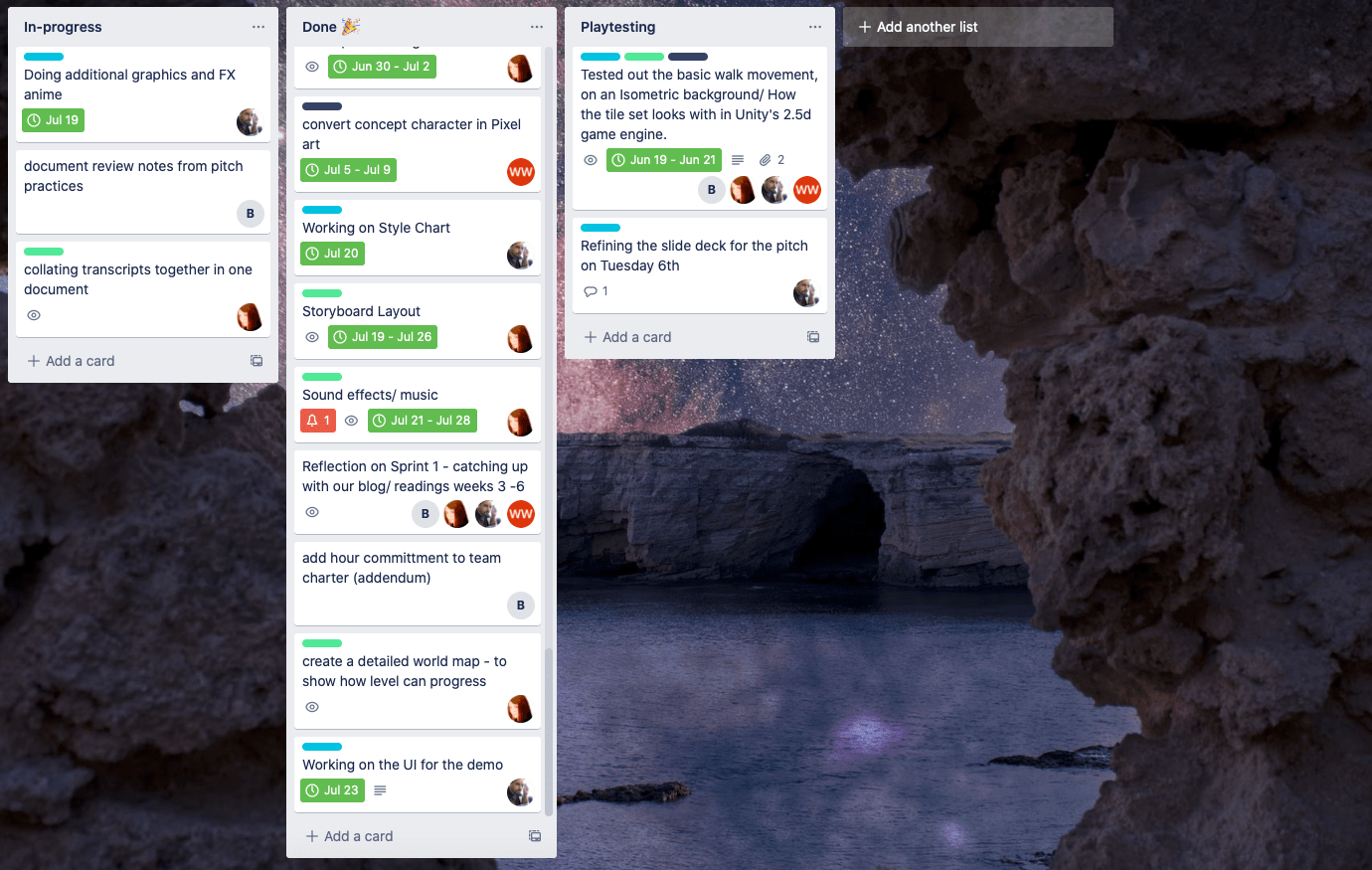
You can see what I am currently working on… One of the most interesting pieces of artwork I have done yet.!!
The
World
Map
I started off by re looking at my first basic isometric map, that I created in the beginning. Just to jog your memory…please see the image below…
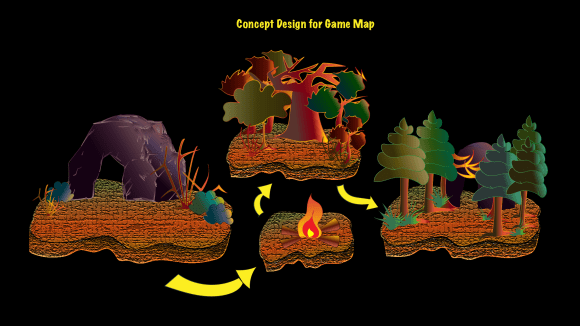
My initial inspiration was from some isometric maps I had been researching before hand, as a way of allowing the player to understand where they start in the game’s first level for; Keep It Burning, and what the end goal was, ie. finding another cave dwelling… bigger, more equipped, and more protected from predators.
However as I progressed with my concept art, after the practice pitch, one piece of my art work had been completely forgotten about, and I realised I wanted to focus more on the map I originally made with the style in mind as Bear & Breakfast, as per below.
(Figure 3 : Gummy Cat 2021 Progress Map: Bear & Breakfast)

Problem
Because I loved everything about the Bear & Breakfast Pitch Deck, I was extremely keen to stick with this style for the map, the notion of keeping everything straight forward, knowing exactly where you start, and where you end up, after progressing through the level, was my initial goal.
However my Original Concept Design for the Game Map didn’t get any response from the team at the time, which was not helpful. I knew it didn’t work other wise they would have said something, anyhow I was not sure why? I was under the impression that I needed to draw up a simple layout map, to show as part of our, ten minute video coming up. Everything was on layers, in Illustrator, so each layer was easy to remove at any time, if it didn’t work, if that was the case!?
Solution
After speaking to the others about the map, more recently, I proposed my idea, to say this is the map style I am looking at now, as the map is important, to show our progression, and this is the art work that caught my eye.
This is what I used as my world map inspiration layout, as it clearly shows 4 areas, and some hidden by cloud. I was sure that everyone would be keen on the layout, as it fit more perfectly with our in game pixel art style too. I assume this was the reason that I didn’t receive feedback, due to me personally not doing pixel art, even though we said at the beginning of the project that we would mix textures.!? Luckily I was right, and they all was keen for me to experiment with the style…
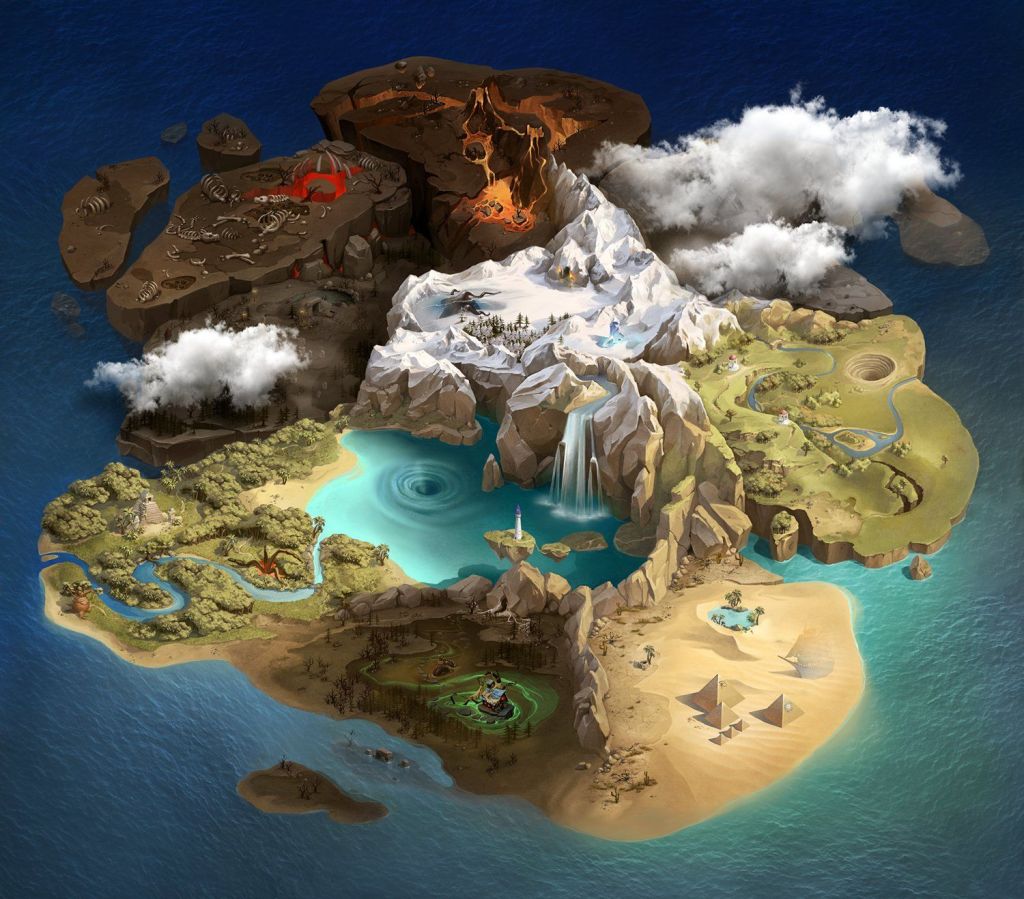
As you can see the amount of detail that has gone into Kaskina’s Location of Land is amazing. All I want to do in my version, is focus on creating at least 4 , domain’s, one as the starting area, next, where you progress too, and a couple locked locations hidden by the cloud, finished with a little detail.
Below is a gallery so you can see my progress.

Stage 1 – laying the land out – creating shapes 
Stage 2 – adding a large lake /river 
Stage 3 – manipulating large lake /river and adding waterfall 
Stage 4 – change lake colour/ add a little colour to one domain 
Stage 5 – finally add some detail/ add more colour to main domain 
Stage 6 – intensify both domains/ with detail, colour, and add cloud 
Stage 7 – zoom in/ double check effect for lake and clouds are clear…
Week 10.3 – 4th August. 2021
Reflecting
During the week, I have started to feel that we really are picking up the speed, but I think this is because everyone realises, that we only have a couple weeks to go and ideally it would be productive now, for each team member to focus on catching up with their blogs. In regards to time pressure, the reading; What Do We Know About Time Pressure in Software Development?, by Kuutila, Mantyla, Farooq, & Claes.
On the positive side, time pressure can force a development team to focus on the paramount features of a product. On the negative side, time pressure can induce tunnel vision where making the next deadline is prioritized over product quality and worker well-being.
(Kuutila, Mantyla, Farooq, & Claes. 2020)
.
According to; Kuutila, Mantyla, Farooq, & Claes, software development has usually got a fair amount of time pressure and deadlines involved, which can lead to all different outcomes. I understand it, not always to be a bad thing, as it can almost give you a boost of positivity…
I believe that when you are nearing your end goal, their is an automatic switch inside that says go..go..go.., even if you have been giving your all throughout the project, you just want to push your self a tiny bit more, (not that you actually do though). Then when it is the time to view the prototype, and check out the finished artefact… it feels so rewarding.
Its almost like reaching the crescendo just before the end of a song, I start to feel relaxed once I have reached that final big note…then sad and pleased at the same time, because although the song has finished, you can begin the same process again, another time.
References
DeMarco, T. and Lister, T., 2013. Peopleware: productive projects and teams. Addison-Wesley.
Kaskina, E. 2021. Location of Land. Available at : https://www.pinterest.co.uk/pin/161003755405283700/ [Accessed 03/08/21]
Herring, P. 2020. Phoebe Herring on Freelance. Available at : https://flex.falmouth.ac.uk/courses/913/pages/week-10-phoebe-herring-on-freelance?module_item_id=54820 [Accessed 31/07/21]
New, W. 2020. My experience creating a startup at Launchpad. Available at : https://flex.falmouth.ac.uk/courses/913/pages/week-10-alumni-video-warwick-new?module_item_id=54821 [Accessed 31/07/21]
Kuutila, M., Mantyla, M., Farooq, U., & Claes, M. 2020. What Do We Know About Time Pressure in Software Development? IEEE Software.
Full list of Figures
Figure 1 : Norton, Ward, Lakin and Land 2021 The Wild Branch Kanban Board
Figure 2 : Norton 2021 Original Concept Design for Game Map
Figure 3 : Gummy Cat 2021 Progress Map: Bear & Breakfast
Figure 4 : Kashkina 2021 Location of land: on Art Station




 RALPHY GETS ANIMATED..?