Categories
GDD710 - Module 1

Personal Case Study

Week 12.1 – 1st May. 2021

Personal Case Study Video

Transcript

Introduction

Welcome…

I’m Deb’s Norton, I am a student, studying a Masters Degree, for Indie Game Dev, with Falmouth University.

When I first began, my Initial intention was to focus on learning how too animate, so I could apply it to my character Ralphy, from my children’s books that I have written and illustrated.

By the end of the 2 years, I hope to have produced a prototype for an interactive story telling app or game. This would actually allow young children to create their own personal stories with a narrative of their own choice, taking them into a world of imagination and adventure.

Accomplishments For Module 710

In The Beginning Unity and Blender

I began the module by focusing on learning how to use sprites, bring assets, and backgrounds into Unity, I started placing Ralphy’s drawings I had of him into the game engine, and simply getting him to move. I also experimented placing Ralphy and different backgrounds into Blender, a 3D computer graphics software tool.

With a little help from one of my peers, this was created.

I was so pleased with the result…but this was only just the beginning of my journey into character animation.

12 weeks later – The Reflection…

Since then, I have achieved a lot more. I’ve had a brief over view with C sharp script with coding using Visual Studio, a coding editor, created a basic animatic using frame animation, and converted it into video layers both in Photoshop, and learnt about the drawing tools in Storyboard Pro and created a character.

I have also created a repository, placed game assets into it, and managed to check it worked ok. Plus tested out Trello, a board, to help with organisation and time management, and looked at applying different methodologies to my practice, such as Waterfall method, Scrum Agile Frame work, and most recently I have been practicing Kanban.

Lessons learnt from rapid Ideation Sessions

Rapid Ideation 1


This task was a massive learning curve for me, not only did I get to experiment with a new Prototyping tool, Storyboard Pro, but I managed to create a new character for a game concept I had in mind. 

I had watched a beginners tutorial, payed attention to the drawing controls, so I could remediate the original artefact to create something new.

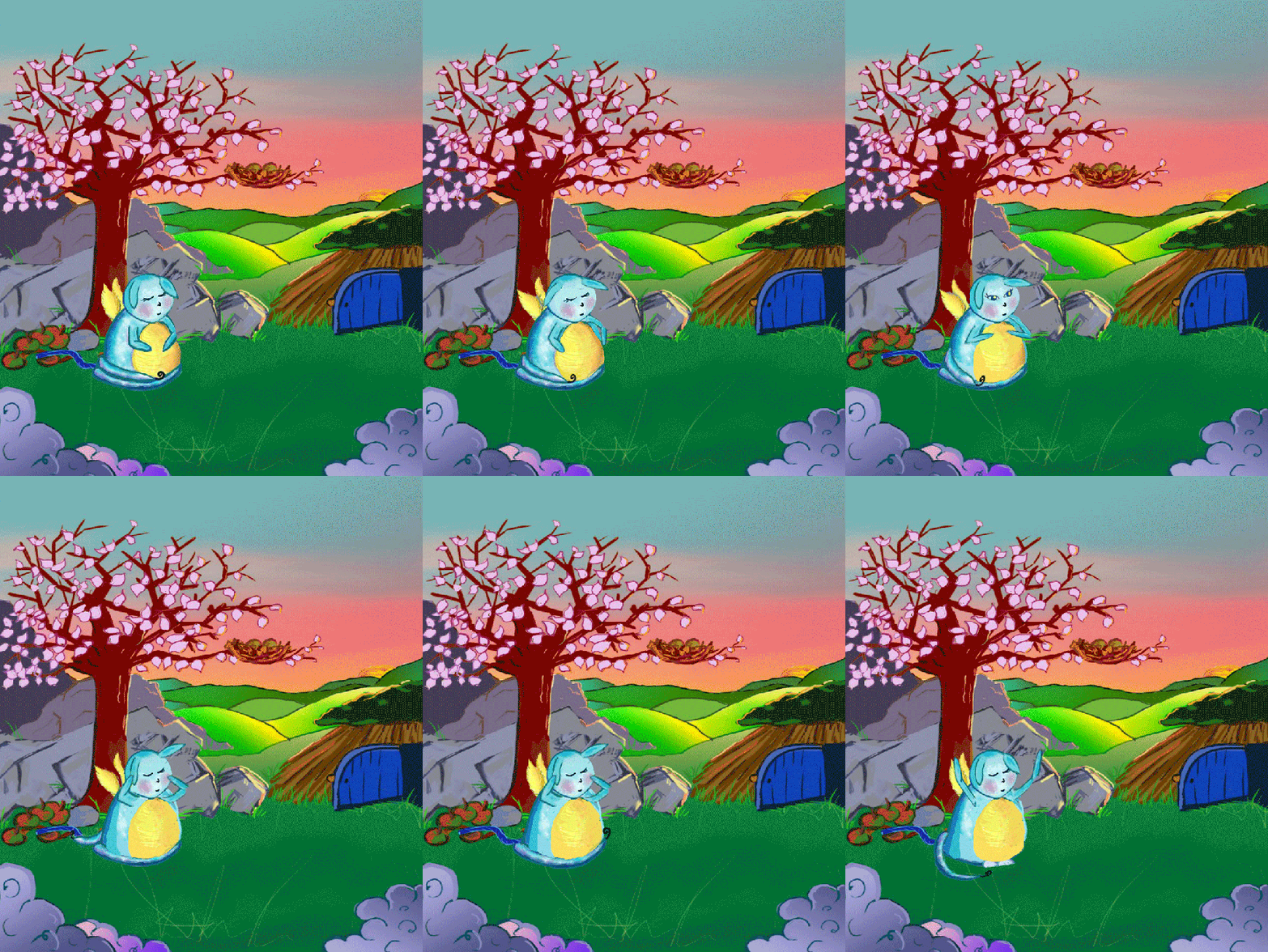
I concentrated on designing a background, working out how to introduce Ickle in the game, created a story, and started off developing my concept for Ickles waking up process, using frame animation, added background theme tune  Sound.org that was gentle enough as you can hear, to wake up to. I wanted to add a humorous touch to the beginning of this game.

Looking back on my process, I think I was too focused on how to make something impressive, from a new tool, but I ended up using one I already knew about.

Rapid Ideation 2

Based on Patricio’s original concept,”a sea creature fighting human contamination. Our starting point, was using a fish animatic he never used.

This RI had many iteration stages. We focused on backgrounds, textures, and rubbish beneath the sea. I experimented with colour changes in Photoshop, and discovered the quickest way to apply blends to the sea creature, with a focus on making it look ill. 

We worked with a Trello board, to help organise our project.
We continued to analyse our progress of the game play concept, researched more into numerous documentary’s, tested the fish in the background and eating trash.
We incorporated real facts, from “our Plastic Ocean” documentary, helping to make children aware of the pollution in the ocean, and allowing them to make the incremental changes and learn about recycling, but without them being scared by the harsh facts that would pop up.

Conclusion

This result is what specifically encouraged me to experiment with Ickle again, (from RI- 1), using animate cc in the Easter holiday. (add as text on screen)

Looking back over the two game jams, I wish I had Just stuck to using adobes creative cloud, and not other computer animation software, and had read more about the technique behind animating,.

Key areas of research to develop throughout the 2 years

I want to be an animator, so I have watched a lot of video material of behind the scenes footage…like Pixar for instance, plus I have looked at academic peer reviews such as …The interactive animated e-book as a word learning device for kindergartners. It questions whether, static books – animated ebooks – Interactive animated ebooks, can help kindergarteners aged 4-5 to learn words and story comprehension, when storybooks include; Motion pictures, sounds, background music and interactive vocabulary actions.

Comic – based Digital Storytelling with Primary School Children, This 2nd case study looks at a digital tool, named Communics, can help primary school children create stories.

From this study we learned that digital storytelling seems to be a promising tool for reflecting on situations involving discrimination, although true benefits have to be further investigated.”

(Rutta, Schiavo, Zancanaro, and Rubegni 2019)

Children’s responses to the interactivity of storybook apps in family shared reading events involving the iPad

An ethnography report, about screen‐based interactivity, and children’s engagement with storybook apps. Interactive features and the children’s responses to them.
They discover that interactive elements make the child feel important as the storyteller.

SMART goals

All of my goals are underpinned from academic papers, case studies, articles and industry papers. So far I have engaged with life drawing, anatomy sketches, cartooning, animated gifts, and game art.

  • I want to become proficient in Adobe Character Animator, to learn about character rigging. I will measure this by crafting prototypes, following Adobes tutorials for 2 hours a day. It is achievable as I have already started practicing for this video. It’s relevant to my Interactive Storybook App or Game, and is vital for creating great animation!
  • I want to learn more about interactive features in app games, as this is part of keeping a child engaged. I will measure this by practicing with incorporating animated backgrounds to an animatic, achievable as I know how, for an hour a day and relevant to my final project.
  • Finally I want to develop my knowledge of Unity, and focus on getting Ralphy and other new characters to move in the game engine, up to 4 hours week, and will measure by short beginners tutorials on LinkedIn Learning. It is achievable, as I know some basics, and relevant to my final project.

I hope you have enjoyed seeing my development so far.

Thank you for watching…

Peer Review References

Aliagas, C. and Margallo, A.M., 2017. Children’s responses to the interactivity of storybook apps in family shared reading events involving the iPad. Literacy51(1), pp.44-52.

Rutta, C.B., Schiavo, G., Zancanaro, M. and Rubegni, E., 2019, June. Comic-based digital storytelling with primary school children. In Proceedings of the 18th ACM International Conference on Interaction Design and Children (pp. 508-513).

Smeets, D.J. and A.G. BUS. 2015. The interactive animated e-book as a word learning device for kindergartners. Applied Psycholinguistics36(4), p.899.

References

DRAY, Ethan. 2017. ‘Photoshop Animation Tutorial: Frame by Frame
Character Walk’. Available at : https://www.youtube.com/watch?v=Llr_KTNtdlk [accessed 24 Feb 2021]

LEOPOLD, Klaus and Siegfried KALTENCKER. 2015. Kanban Change
Leadership : Creating a Culture of Continuous Improvement.
John Wiley & Sons, Incorporated.

LIKER, Jeffrey K. 2004. The Toyota Way ; 14 Management Principles from the
Worlds Greatest Manufacturer. McGraw-Hill.

STORM, Olof. 2020. ‘2D Animated Walking Cycle’. Available at
: https://www.youtube.com/watch?v=KDCEvJvAX0w [accessed 25 Feb 2021]

Full List of Figures

Figure 1 : Norton 2021 Ralphy (Adobe Illustrator creation)
Figure 2 : Norton 2021 Ralphy in Blender
Figure 3 : Norton 2020 Pinksky background (Adobe Illustrator creation for
children’s book; ‘Ralphy and the Expanding White Fluffy Ball’)
Figure 4 : Norton 2021 Ralphy in Unity (background created in Adobe Illustrator)
Figure 5 : Norton 2021 Visual Studio/Ralphy/Blender (created in Adobe Photoshop)
Figure 6 : Norton 2021 Ickle (first creation in Storyboard Pro)
Figure 7 : Norton 2016 First Digital Illustration (background created in Adobe
Illustrator for London Art College – Digital Illustration Diploma Course
Figure 8 : Dixit (ND) Original Artefact
Figure 9 : Norton 2021 Ickles Waking Up Positions (created in Adobe Photoshop)

Figure 10 : Norton 2021 Scenery for Ickle (created in Adobe Photoshop)
Figure 11 : Land 2021 Sea Creature eating plastic
Figure 12 : Land 2021 Sea Creature no plastic
Figure 13 : Norton 2021 Game Art/ Trash/ Textures/ colours (created in Adobe Photoshop)
Figure 14 : Norton 2021 Tincan’s Story board (created in Adobe Photoshop)

Full List of Animatics

Norton, D. and P Land 2021. Ralphy in Unity
Norton, D. 2021. Ickle Adobe Photoshop Frame Animatic converted into Video Layers
Land, P. 2018. Fish Animatic – Created in Aseprite
Norton, D. 2021. Seaweed – Created in Adobe Animate CC
Norton, D. 2021. Ickle Easter Holiday V3 – Created in Adobe Animate CC
Norton. D. 2021. pre -designed character – from Character Animator new clothes done by me.

Full List of Tools

Adobe Animate CC. 2021.
Adobe Photoshop CC. 2021.
Adobe Illustrator CC. 2021.
Adobe Charcter Animator. 2021.
Adobe Premiere Pro. 2021.
Blender 3D Computer Graphic Software
Toon Boom – Storyboard Pro. 2021.
Trello Inc. 2021.
Unity Game Engine. 2021.

Game – Tincan – Out in the Ocean

Norton, D and P Land. 2021. Tincan Out in the Ocean – created using Adobe Illustrator,
Photoshop, animate and Unity’s Game Engine

Music

Soundimage.org Mellow – Puzzler 2 MP3 (opening piece)
Soundimage.org Monkey IsandBand MP3 (Ickles theme tune)
Soundimage.org Puzzle Game MP3 (Tincan’s theme tune)

Week 12.2 – 5th May. 2021

The masters for Indie Game Dev, has allowed me to grow as a researcher, and understand, how I can apply different methodology’s to my practice, and reflect on what I have learned so far, and where these skills could possibly lead in my future career, in animation.

“current findings show that electronic storybooks fulfil the promise that multimedia additions can enrich book reading experiences when used properly”

(Smeets and Bus 2015)

Interactive animated ebooks seem to be the best alternative; vocabulary is stimulated, which may help children to increase their understanding of the book they are reading, but the quality of animations is vital.

Categories
GDD710 - Module 1

Agile Practice

Week 10.1 – 14th April. 2021

This week we are asked to delve deeper into Agile Practice, and to get a better understanding of how important this method is, when applying it, especially to a large project and when working on commercial projects.

Project management skills, is what we have been asked to develop further, as this is what will be required in some of our up coming modules.

We are starting this week with a talk from Belinda Waldock who will show us, from looking at her professional experience as an Agile coach who supports SMEs, and helps them to adopt an Agile practice.  

She explains; “the Agile Method evolved, because the Linear approach to creating software was not working, due to time constraints, projects were taking to long to complete, and when a project was finally finished, the client would not be happy as to much time had past, and what they wanted had changed.

(Waldock, B. 2021)

She continues to explain, that from this action, it helped the new method of the Agile approach to be put into place. They adopted a new frame work which would work, with many iterative stages, they were as follows;

  • Discussion
  • Design
  • Construct

From putting this method into action the client is sent this “little bit of software,” which keeps them happy as they are being kept in the loop and by doing so, feed back is given for the incremental changes, which helps to keep the project on track. From this the software developers has a clarified concept of things that need to be included, what can be scrapped, and what can be developed.

Just to note; this means the software developers would not have used up all there resources, or budget, which means they have the time and money left incase anything changed last minute or went wrong, they would still not be out of profit, or resources which is valuable to projects like this.

Process

This is what I have been putting into practice when working on the Trello board. Having everything laid out clearly which shows, what’s being worked on, what needs to be done, and what has been completed. This part of the process is actually really helping to guide me through this term, and allow me to keep organised with staying on top of the workload.

I suppose if we were analysing the Agile approach, we would think about the end goal been the marathon and all the sprints thats are in-between, are what makes up the marathon, so by just focusing on one sprint, we are closer to reaching the end result.

Types of Agile

The methodology that I am incorporating into my thoughts and my process is Kanban. An agile approach, which allows you to focus on one thing at a time, and by doing so, tasks for me seem to be completed a lot quicker.

Although I do still struggle sometimes, with spending too long on one area for example; practical, which leaves less time for reading or research. But I am working hard to keep enforcing this method into my practice.

Week 10.2 – 16th April. 2021

Envisioning ( Product Planning)

After watching Alcwyn Parkers video on envisioning, I feel I have a clearer idea of understanding the importance of product planning. From looking at his research into Kenneth Rubins ‘Essential Scrum‘, I have taken a deeper look into the meaning of envisioning through the magazine article ‘Envisioning Desirements,’ by Robert R Hoffman and Michael J McCloskey.

The goal of the Envisioning Desirements Method (EDM) is to develop a list of “things we could make now that will not rupture the procurement plan or the budget” and “things we can make and add in the future but that we must allow for now in the present build so that the system can be easily upgraded.”

(Hoffman and McCloskey 2013)

My translation of this quote is more simply put as; to build small things now, that won’t put them out of pocket, and which can easily be manipulated in the future.

They explain the reason for the change in the name, this helps them to find a way, by the using results from different human-centered technologies.

Humancentred is an approach that is used to design interactive systems, that are accessible and useful with a close focus on the users requirements. They research into their needs and find out what they specifically want.

Activities Required to Complete the Envisioning Process;

Envision Activities (Product Planning)
INPUTSOUTPUTS
Initial Idea or Pivoted
Idea
Product Vision
(this needs to be explained in a single concise paragraph)
Planning HorizonProduct Backlog
Completion DateProduct Roadmap
Budget/ ResourceOther Artefacts
Confidence Threshold

Week 10.3 – 18th April. 2021

Estimation

From following on with the scrum agile framework, we are asked to research into scrum estimation, and to look at; how to apply estimation techniques, to either our individual practices or how to incorporate them into a team project.

Alcwyn Parker’s video reveals that there are a few different agile techniques, that can be applied to your practice, but the key is to work out how much time you have to practice the techniques.

The Three principles are;

  • How many features will be completed?
  • When will they be done?
  • How much will this cost?

My understanding of this process, is getting to know the skills and weaknesses of your team, and then re-evaluate the time it takes for them to complete a certain feature. Alcwyn quotes;

These techniques require practice but over time it is possible to hone your estimation skills to be more precise and accurate. In a team context, the more mature the team the easier it becomes to estimate how long units of development will take.

(Parker, A. 2021)

He continues to clarify the process; how to convert tasks from the backlog into story points?

This should have already been completed in the envisioning process.

But to go into more detail; Story points is a technique how to estimate, the time required for the task, from evaluating the PBI (product backlog item).

  • The amount of work needed to carry out the task?
  • How much risk and uncertainty are involved?
  • How complicated is the task?

How to Apply to my practice?

If I incorporated this scrum estimation technique into my own practice, I think it would be quite straight forward, but that still depends on the project involved..?

I would like to think if I had to draw assets, for a game, game art, find sound, work out a logo, or work on basic animatics, I should be able to have a really good estimate on the time needed to create these parts, and with knowing the applications I use quite well, and being aware of how quickly they run.

Risk

I wouldn’t have thought there would be any, although the biggest thing that could hold up time is if the application that I choose, needs an update?

But this should not pop up, as I am constantly aware what Adobe Creative Cloud is like, as I have used many of the applications now, especially throughout Indie Game Dev. For this reason, I have advanced a lot more with my current applications, there by I am a lot quicker, and can put the above into action in a small time frame.

Complications – This wouldn’t apply for the things above, because I know where to look if I get stuck. Plus I always allow extra time for a new skill.

If for instance that I wanted to learn more about character rigging, although I have learnt how to create animatics, and a better idea of time frames, I don’t yet know anything about character rigging, thereby I would allow at least 8hours( 1 full working day) when working on a two week RI project.

This will help me stay on board with my smart goals when studying a new skill for one hour at a time, then taking a break and put into practice. By using this method, I can acquire a more thorough way of learning, which should aid my development in this area.

References

Parker, Alcwyn 2021 Envisioning. Available at : https://flex.falmouth.ac.uk/courses/911/pages/week-10-envisioning?module_item_id=49213 [accessed 16/04/21]

PARKER, Alcwyn 2021 Estimation. Available at : https://flex.falmouth.ac.uk/courses/911/pages/week-10-estimation?module_item_id=49214 [accessed 18/04/21]

Rubin, KS. (2013) Essential Scrum. Upper Saddle River, Munich [u.a.]: Addison-Wesley.

Waldock, B. 2015 Being Agile in Business: Discover faster, smarter, leaner ways to work. FT Press.

Waldock, B. 2021 Belinda Waldock on the Agile Movement and Practice. Available at : https://flex.falmouth.ac.uk/courses/911/pages/week-10-belinda-waldock-on-the-agile-movement-and-practice?module_item_id=49212 [accessed 15/04/21]

HOFFMAN, Robert R. and Michael McCloskey. 2013. ‘Envisioning Desirements‘ 28(4).

Categories
GDD710 - Module 1

The Big Reading Week.

Week 6.1 – 10th March. 2021

The Retrospective

After looking at the article heartbeat retrospective, and closely at the common pitfalls, I understand this to be a workshop of reflection, structured with the steps as shown below;

  • Regular meetings with your team to simply debrief.
  • Everyone should feel comfortable to speak, just highlight a few areas, speak the facts only.
  • Discuss the relevant areas that are currently affecting the iteration process.
  • Have a couple solutions to work with, to keep simple.

Their are three main areas, that are considered throughout the retrospective;

  • What should be started?
  • What should be stopped?
  • What should be continued?

My Start item will be: (marked with two stars **)

  • Reading one journal article a week to inform your practice
  • Writing a progress summary in your journal before you attend the webinar
  • Writing a weekly plan to help structure the work **

My Stop item will be:(marked with two stars**)

  • Burning the candle at both ends **
  • Working in a silo and not seeking advice and support from peers
  • Leaving it until the last minute to write in the journal

My Continue item will be: (marked with two stars**)

  • Posting in the forums on a regular basis
  • Follow tutorials as part of the self-directed practice**
  • Attending the webinars

Both the start and stop items are used automatically when my SMART goals were noted, as they seem to follow through what I have put in place.

Retrospective is key to reflect on what happened, any iterative processes put in place which didn’t work, analyse why and devise a plan to avoid happening next time around. But keep simple.

Session 1 Rapid Ideation – Reflection

Looking back on the development of rapid ideation session one, I know for sure that there was room for improvement. I wish I had, had my SMART goals in place, and only learnt a little about 2D animation for example, and not to of tried using so many new applications, which just holted my progress altogether, and made me question, if I was even capable of learning a new technical skill this quickly.

Pages and Posts

That doesn’t even include, the fact of which I was struggling with writing a post on here, and realising I had my entries as pages, not posts. This was a big turning point for me, after working this out, I was able to add tags, and categories, to make my site more accessible. This is where I started to understand the need for an organised, well structured website.

Week 6.2 – 11th March. 2021

SMART – Ready – SET – GO !!

To reiterate, in this coming webinar, when we get out next rapid ideation tool to experiment with, I am going to do things differently.

I have my goals in place to help with organising my time:

  • To do an equal amount of research; including reading, writing, watching, linkedIn learning, and practical.
  • Make sure to stick with my idea, not to get distracted by all other possibilities.
  • To learn new technical skills for an hour at a time, break, and try out what I have just learnt, rather than jumping to far ahead!

Since making my self SMART goals, I have started to continue reading ‘Level up’, to understand more about the process of creating a game from scratch. This is where I put my organised schedule into action.


In Chapter 4 ( level 4 ) titled; ‘You Can Design a Game, but Can You Do the Paperwork?’
Scott Rogers states;

“It’s no crime to be a perfectionist, but many design issues can be thought out and designed on paper first before a single pixel is rendered or a line of code typed.”

(S, Rogers. 2014. p90)


This immediately grabbed my attention, my determination of trying to create something that will look amazing on screen, and helping to engineer a game/ app or animation that you just can’t leave alone, is all I seem to focus on!

This is exactly what I have done with with my personal development, and because of trying to add code, and bring Ralphy to life in only a few frames, it was impossible to get a decent animated character.


I think it might be worth going back to basics, sticking with drawing and scanning my work, ideas and laying out concepts on paper, before even thinking of bringing my illustrations to life.

After all this is what Briggs would do when he originally created ‘The Snowman‘, and he is one of the illustrators, who pays very close attention to adding emotion and movement behind all of his sketches, before even laying them out onto a storyboard.


Week 6.3 – 14th March. 2021

Points to remember

Rogers also discusses in his book ‘Level Up‘, how important it is to be mindful of your peers, as we all have our own limitations.

We first discussed this in week one, talking about Scrum agile framework …It’s vital we have someone in charge, ideally that can make sure that each person, (when in a team) is doing their part, and has been assigned the correct area, that matches their skill.
Other wise, this could dramatically hold everyone up, especially when that person doesn’t quite understand what is expected of them. 

Throughout this course, I feel like I am on the biggest learning curve ever, with excitement leading the way, I pinch myself just to check that what I am creating is real…and can be improved or developed in one way or another.

Kanban

I am now starting, very slowly, but surely to understand the nature of reflection. 
I have started to read another book, which my partner has actually recommended;

The Toyota Way : 14 Management Principles; from the Worlds Greatest Manufacturer.

This actually links onto the Kanban Method that I have been practicing.

The book reveals the methods and approaches, used in production;

Jidoka – Originated from an invention from Toyoda, a carpenter who made wooden spinning machines, and in 1894 the manual looms he started experimenting with, were low in cost, but worked better than his existing looms.

“designing operations and equipment so your workers are not tied to machines and are free to perform value added work.”

J K, Liker. 2004 P16

This step would lead to the creation of a much broader System!!

Toyoda; Unhappy with seeing his mother, grandmother and friends working so hard, this sent him down his next path, and took production to next level.

“He wanted to find a way to relieve them of this punishing labor, so he set out to develop power-driven looms.”

(J K, Liker. 2004 p16)

This intention was crucial, and helped to build TPS (Toyota Production System).

  • Jidoka (automation without human touch)
  • JIT ( Just In Time) – to order what parts you are running out of, just before you do runout.
  • Continuous Flow (focusing on today, and tomorrow)
  • Kaizen (change for the better)

This is what brings us to Taiichi Ohno – the founder of the TPS, (Toyota Production System), which has a strong focus on Jidoka, Toyoda’s sons approach JIT, (Just In Time) and his own discovery Continuous Flow. He also talks about Kanban and Kaizen.

He compares Kanban to a gas gauge that is built into the car – when it signals – you know you need to fill up. As for Kaizen, making tiny improvements is just as important when achieving a lean goal, which eliminates all waste, that adds cost without adding to value.

References

Heartbeat Retrospective (2020). Available at: https://bit.ly/3b17dtO [accessed 10 March 2021]

ROGERS, Scott. 2014. Level Up ; The Guide To Great Video Game Design. 2nd edn. John Wiley & Sons, Ltd.

LIKER, Jeffrey K. 2004. The Toyota Way ; 14 Management Principles from the Worlds Greatest Manufacturer. McGraw-Hill.

Categories
GDD710 - Module 1

Rapid Ideation Session 1 – Continued

Week 5.1 – 24th February. 2021

Research

I have been researching Olaf Storm – with his photoshop tutorials, his method uses video layers, which is what I am now using. He looks at frame rates, characters on 2’s and the other small movements like feet and and hand movements on 1’s.

He showed the smooth transition when using an onion skin, which I believe to be like a sketch over your original character, for you to redraw over, each time slightly adjusting your angle, to where you want your character to move.
I haven’t used the onion skin yet…but it is next on my list.
The effect you get afterwards is amazing, and makes the object or character movement a lot more fluid, but takes a lot more time. 

https://youtube.com/watch?v=KDCEvJvAX0w%3Fversion%3D3%26rel%3D1%26showsearch%3D0%26showinfo%3D1%26iv_load_policy%3D1%26fs%3D1%26hl%3Den%26autohide%3D2%26wmode%3Dtransparent

Method Olaf uses;

  • Draw very rough to begin with
  • Then draws more detail
  • More detail – until character or objects have shape and definition
  • Finally he adds a colour layer 

This process takes a lot of time, which I don’t have for this rapid ideation session. 

My Process

  • Draw my background with enough detail to set the scene – convert to regular layer.
  • Draw my character with detail from the start -Focusing on my 6 points, I had specified from the last part of the rapid ideation brainstorm session.(Artboard 4)
  • Then copy the original character layer, and place above
  • Select and manipulate, the arms, tail and head in the first few frames, then start moving the wings and mouth, for the frames remaining.
  • As you are doing so, you only need to draw in occasional areas of colour, on that next layer you are working on. (shadow maybe left from last movement, this will need to be erased.)
  • Add music – researched humorous theme tunes for animations, or a start of a game.

Result

Here is the background for Ickle, I created it in Photoshop, paying close attention to the detail, and transferring one of the themes from the headline: colours are very important, so everything must be vibrant.

Combining SpongeBobs character; bright, fun, and friendly.

Plus the theme of loosing a friend; that is where the main character Ickle, will have to find fairy’s/ elf like creatures, in order to grant him his original wish. He is hoping to be small again.

He will need help from all; to find out where the creature is, from all those years ago.

Figure 1: Norton 2021 Background for Ickle

The story behind Ickle;

When Ickle was born, it was neither Little or Insy, but was rather Ickle.

One day, on his 3rd birthday, Ickle made a wish, that he could be a ‘tinsy, winsy bit bigger ‘

From that day, he has been searching for the fairy/elf creature, what ever it was to revisit that wish, and undo it.

Please see below, my first animation ever…

Ickle Waking Up

Week 5.2 – 1st March. 2021

Holistic Reflection –  The Five Key Skill Domains

This week are asked to look into the five domains, which are important, when writing reflectively.

  1. Dispositional Domain – time management/ motivation/ general behaviour/ discipline
  2. Affective Domain – experiences/ feelings/ emotions
  3. Interpersonal Domain – communication/ listening/ problem solving/ decision making
  4. Cognitive Domain – strengths/ weaknesses/ approach to new skills/ how to excel
  5. Procedural Domain – assessing current skills/ how to improve

Below is the points of how I presume I write, learn, and develop my ideas.

  • My focus always starts with dispositional domain; motivation to learn something new, begin a brainstorm and see where it leads.
  • Next, after the initial concept, would be the procedural domain; assess what skills I would need, or I have, and how to put them into action and look at what I need to improve.
  • Which leads to the cognitive domain; if I need to learn something new, I go straight to LinkedIn Learning, and start immediately, and making notes.
  • As for the next part of my process, to put what I had learnt to the test. However the affective domain takes over; with excitement leading the path to a new creation, because of a recent skill I just learnt, the Interpersonal domain; assertiveness in particular is pushed to the side.

Results of how I have used the Five Domain’s so far;

After looking through my posts, these are the results for each domain;

  • Dispositonal     – 5
  • Affective           –  5
  • Interpersonal   –  4
  • Cognitive          –  3
  • Procedural        –  6

I have generally tried to always include the Disposition domain; especially my motivation behind an idea, but not necessarily time management.

I always include Affective domain; how I feel, and any experience I have or want the gamer to have. I think this is very important, it helps tell the story behind, what you are trying to achieve, or why you want to look into that particular area.

As for the Interpersonal domain; This is slightly lower, I think its due to me making a decision, getting excited about it, but then thinking about alternative pathways, which then halts my progress.

Cognitive domain; this is the lowest , and I know why because when I am learning a new skill, like 2D Animation Principles, I sit and do all the learning at once, even if its hours on end…and write continuous notes, thinking I am going to take it all in. . .but its not possible.

Finally for the Procedural domain; This is what I am trying to do consistently, though too much at once.

Nature of Reflection

Throughout the start of this course, I have tried to reflect in a way that allows the viewer to see from all angles, how I feel about the start of a project, the initial concept, what my development process is, and the end result. However, I personally feel some areas are out of my control, to be clear, its when we receive a new assignment. I focus too much on how amazing the artefact/ project could be in the end, rather than focusing on one area at a time.

This hinders my progress, and now after looking further into SMART goals, I feel more at ease and in control.

S M A R T  (goals)

  • S – Specific – the 5 W’s  (what, where, when, why, who)  think about How?
  • M – Measurable – 
  • A – Achievable – Push yourself, but not so much that it is unachievable.- Think about – can you achieve it within the set time? have you got the money? or have you got the skill, or will learning a new skill set you back from putting your concept into action? 
  • R – Relevant – Are you the best person on the team to do what is required, or is there some one else, who has more skill that particular area?
  • T – Time – bound, specify length of time to do course, how many hours you will commit to train each week? 

From this analysis of the five domains used throughout my critical reflective journal, it has automatically helped me to create my SMART goals, as I can see my flaws very clearly,.

1) Dispositional domaintime management, I need to do an equal amount of each: ReadingWritingLinkedIn learningPracticing, Creating, this is achievable if I do an hour of each, every day.

2) Interpersonal domain; Must make a decision and stick with it, work out initial plan, that I can do whilst at home, in a day by myself, to help towards the current project that I am working on.

3) Cognitive domain; Must study an hour at time, when learning a new skill. Must have a break, and practice what I have learnt first, before jumping to the next stage. Once the new skill is in practice, I can get a better Idea of the length of time to complete this task.

The three SMART goals are just what I need to speed up my rapid ideation processes, to keep focused, but relaxed, knowing I am hitting my targets, and have time to spare, if I need it.

If I was in a creative role now, I know these would already be in place.

References

STORM, Olof. 2020. ‘2D Animated Walking Cycle’. Available at : https://www.youtube.com/watch?v=KDCEvJvAX0w [accessed 25 Feb 2021]

PARKER, Alcwyn. 2021. ‘Holistic Reflection: The Five Key Skill Domains’. Available at : https://flex.falmouth.ac.uk/courses/911/pages/week-5-the-five-reflective-domains?module_item_id=49171 [accessed 1 March 2021]

Fulll List of Figures

Figure 1: Norton 2021 Background for Ickle