Week 5.1 – 24th February. 2021
Research
I have been researching Olaf Storm – with his photoshop tutorials, his method uses video layers, which is what I am now using. He looks at frame rates, characters on 2’s and the other small movements like feet and and hand movements on 1’s.
He showed the smooth transition when using an onion skin, which I believe to be like a sketch over your original character, for you to redraw over, each time slightly adjusting your angle, to where you want your character to move.
I haven’t used the onion skin yet…but it is next on my list.
The effect you get afterwards is amazing, and makes the object or character movement a lot more fluid, but takes a lot more time.
Method Olaf uses;
- Draw very rough to begin with
- Then draws more detail
- More detail – until character or objects have shape and definition
- Finally he adds a colour layer
This process takes a lot of time, which I don’t have for this rapid ideation session.
My Process
- Draw my background with enough detail to set the scene – convert to regular layer.
- Draw my character with detail from the start -Focusing on my 6 points, I had specified from the last part of the rapid ideation brainstorm session.(Artboard 4)
- Then copy the original character layer, and place above
- Select and manipulate, the arms, tail and head in the first few frames, then start moving the wings and mouth, for the frames remaining.
- As you are doing so, you only need to draw in occasional areas of colour, on that next layer you are working on. (shadow maybe left from last movement, this will need to be erased.)
- Add music – researched humorous theme tunes for animations, or a start of a game.
Result
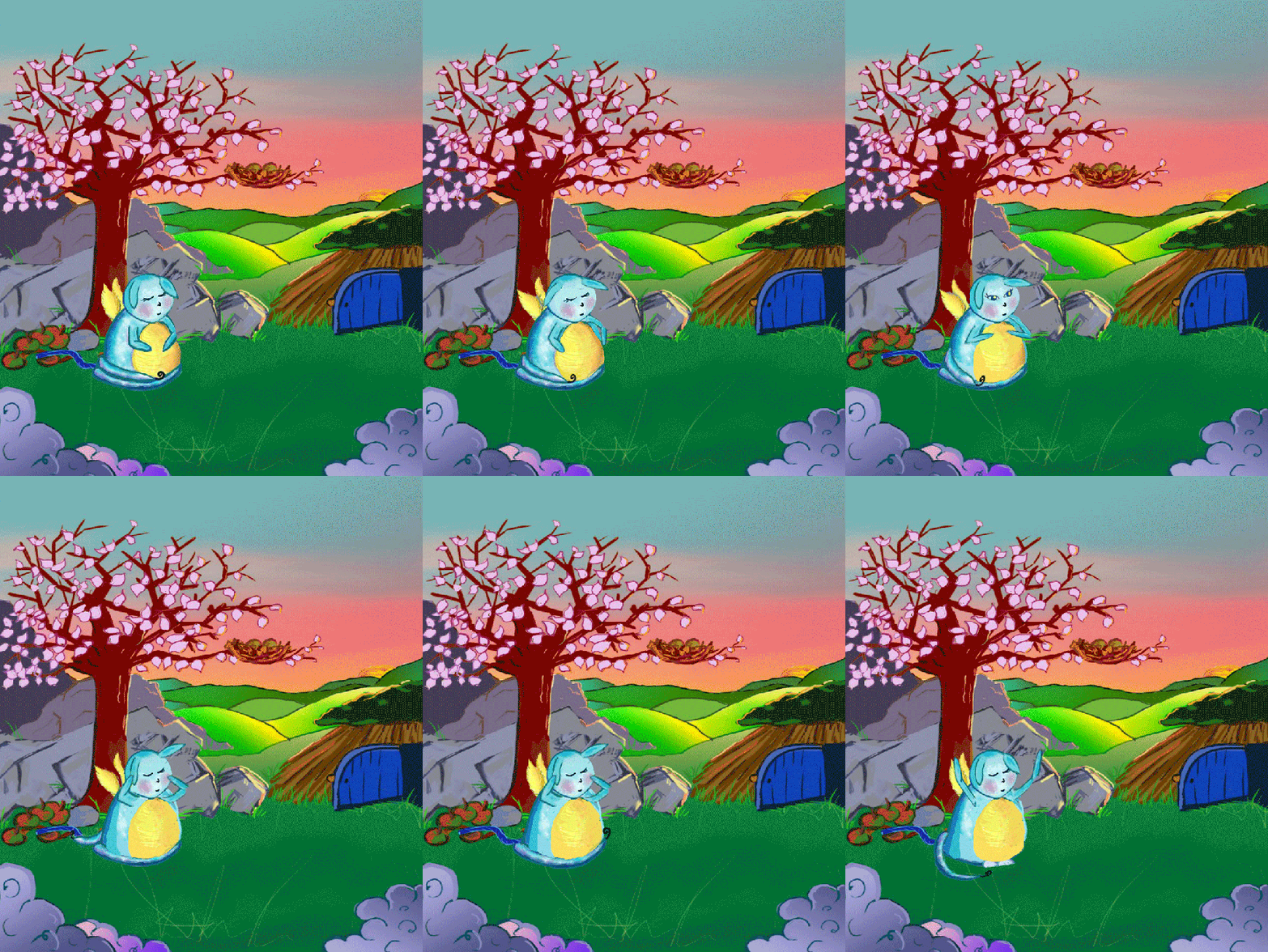
Here is the background for Ickle, I created it in Photoshop, paying close attention to the detail, and transferring one of the themes from the headline: colours are very important, so everything must be vibrant.
Combining SpongeBobs character; bright, fun, and friendly.
Plus the theme of loosing a friend; that is where the main character Ickle, will have to find fairy’s/ elf like creatures, in order to grant him his original wish. He is hoping to be small again.
He will need help from all; to find out where the creature is, from all those years ago.

The story behind Ickle;
When Ickle was born, it was neither Little or Insy, but was rather Ickle.
One day, on his 3rd birthday, Ickle made a wish, that he could be a ‘tinsy, winsy bit bigger ‘
From that day, he has been searching for the fairy/elf creature, what ever it was to revisit that wish, and undo it.
Please see below, my first animation ever…
Ickle Waking Up
Week 5.2 – 1st March. 2021
Holistic Reflection – The Five Key Skill Domains
This week are asked to look into the five domains, which are important, when writing reflectively.
- Dispositional Domain – time management/ motivation/ general behaviour/ discipline
- Affective Domain – experiences/ feelings/ emotions
- Interpersonal Domain – communication/ listening/ problem solving/ decision making
- Cognitive Domain – strengths/ weaknesses/ approach to new skills/ how to excel
- Procedural Domain – assessing current skills/ how to improve
Below is the points of how I presume I write, learn, and develop my ideas.
- My focus always starts with dispositional domain; motivation to learn something new, begin a brainstorm and see where it leads.
- Next, after the initial concept, would be the procedural domain; assess what skills I would need, or I have, and how to put them into action and look at what I need to improve.
- Which leads to the cognitive domain; if I need to learn something new, I go straight to LinkedIn Learning, and start immediately, and making notes.
- As for the next part of my process, to put what I had learnt to the test. However the affective domain takes over; with excitement leading the path to a new creation, because of a recent skill I just learnt, the Interpersonal domain; assertiveness in particular is pushed to the side.
Results of how I have used the Five Domain’s so far;
After looking through my posts, these are the results for each domain;
- Dispositonal – 5
- Affective – 5
- Interpersonal – 4
- Cognitive – 3
- Procedural – 6
I have generally tried to always include the Disposition domain; especially my motivation behind an idea, but not necessarily time management.
I always include Affective domain; how I feel, and any experience I have or want the gamer to have. I think this is very important, it helps tell the story behind, what you are trying to achieve, or why you want to look into that particular area.
As for the Interpersonal domain; This is slightly lower, I think its due to me making a decision, getting excited about it, but then thinking about alternative pathways, which then halts my progress.
Cognitive domain; this is the lowest , and I know why because when I am learning a new skill, like 2D Animation Principles, I sit and do all the learning at once, even if its hours on end…and write continuous notes, thinking I am going to take it all in. . .but its not possible.
Finally for the Procedural domain; This is what I am trying to do consistently, though too much at once.
Nature of Reflection
Throughout the start of this course, I have tried to reflect in a way that allows the viewer to see from all angles, how I feel about the start of a project, the initial concept, what my development process is, and the end result. However, I personally feel some areas are out of my control, to be clear, its when we receive a new assignment. I focus too much on how amazing the artefact/ project could be in the end, rather than focusing on one area at a time.
This hinders my progress, and now after looking further into SMART goals, I feel more at ease and in control.
S M A R T (goals)
- S – Specific – the 5 W’s (what, where, when, why, who) think about How?
- M – Measurable –
- A – Achievable – Push yourself, but not so much that it is unachievable.- Think about – can you achieve it within the set time? have you got the money? or have you got the skill, or will learning a new skill set you back from putting your concept into action?
- R – Relevant – Are you the best person on the team to do what is required, or is there some one else, who has more skill that particular area?
- T – Time – bound, specify length of time to do course, how many hours you will commit to train each week?
From this analysis of the five domains used throughout my critical reflective journal, it has automatically helped me to create my SMART goals, as I can see my flaws very clearly,.
1) Dispositional domain: time management, I need to do an equal amount of each: Reading, Writing, LinkedIn learning, Practicing, Creating, this is achievable if I do an hour of each, every day.
2) Interpersonal domain; Must make a decision and stick with it, work out initial plan, that I can do whilst at home, in a day by myself, to help towards the current project that I am working on.
3) Cognitive domain; Must study an hour at time, when learning a new skill. Must have a break, and practice what I have learnt first, before jumping to the next stage. Once the new skill is in practice, I can get a better Idea of the length of time to complete this task.
The three SMART goals are just what I need to speed up my rapid ideation processes, to keep focused, but relaxed, knowing I am hitting my targets, and have time to spare, if I need it.
If I was in a creative role now, I know these would already be in place.
References
STORM, Olof. 2020. ‘2D Animated Walking Cycle’. Available at : https://www.youtube.com/watch?v=KDCEvJvAX0w [accessed 25 Feb 2021]
PARKER, Alcwyn. 2021. ‘Holistic Reflection: The Five Key Skill Domains’. Available at : https://flex.falmouth.ac.uk/courses/911/pages/week-5-the-five-reflective-domains?module_item_id=49171 [accessed 1 March 2021]
Fulll List of Figures
Figure 1: Norton 2021 Background for Ickle

 RALPHY GETS ANIMATED..?
